How to update Kotlin in Android Studio

The Problem
You can avoid unexpected issues by keeping the Kotlin versions in your project updated, especially when updating Gradle versions.
Each Kotlin version has a minimum and maximum supported Gradle version and using incompatible versions may cause errors such as:
BUILD FAILED in 8s
[!] Your project requires a newer version of the Kotlin Gradle plugin.
    Find the latest version on https://kotlinlang.org/docs/gradle.html#plugin-and-versions, then update project/android/build.gradle:
    ext.kotlin_version = '<latest-version>'
Exception: Gradle task assembleDebug failed with exit code 1
The Solution
When updating Kotlin to the latest version, update the Android Gradle plugin (AGP), Gradle, and the Java Development Kit (JDK) to avoid incompatibility issues.
First, open the project-level build.gradle file located in the root of your project and update the plugins block. The example below will update Kotlin to version 2.4.0:
plugins {
    id 'com.android.application' version '9.4.0' apply false
    id 'com.android.library' version '9.4.0' apply false
    id 'org.jetbrains.kotlin.android' version '2.4.0' apply false
}
The lines containing com.android.application and com.android.library update the Android Gradle plugin.
Next, update Gradle by navigating to the gradle/gradle-wrapper.properties file and changing the version number in the distributionUrl. Here we’re using Gradle version 9.7.1:
distributionUrl=https\://services.gradle.org/distributions/gradle-9.7.1-bin.zipTo update the JDK to use Java 17, open the app/build.gradle file and update the following lines:
compileOptions {
    sourceCompatibility JavaVersion.VERSION_17
    targetCompatibility JavaVersion.VERSION_17
}
kotlinOptions {
    jvmTarget = '17'
}
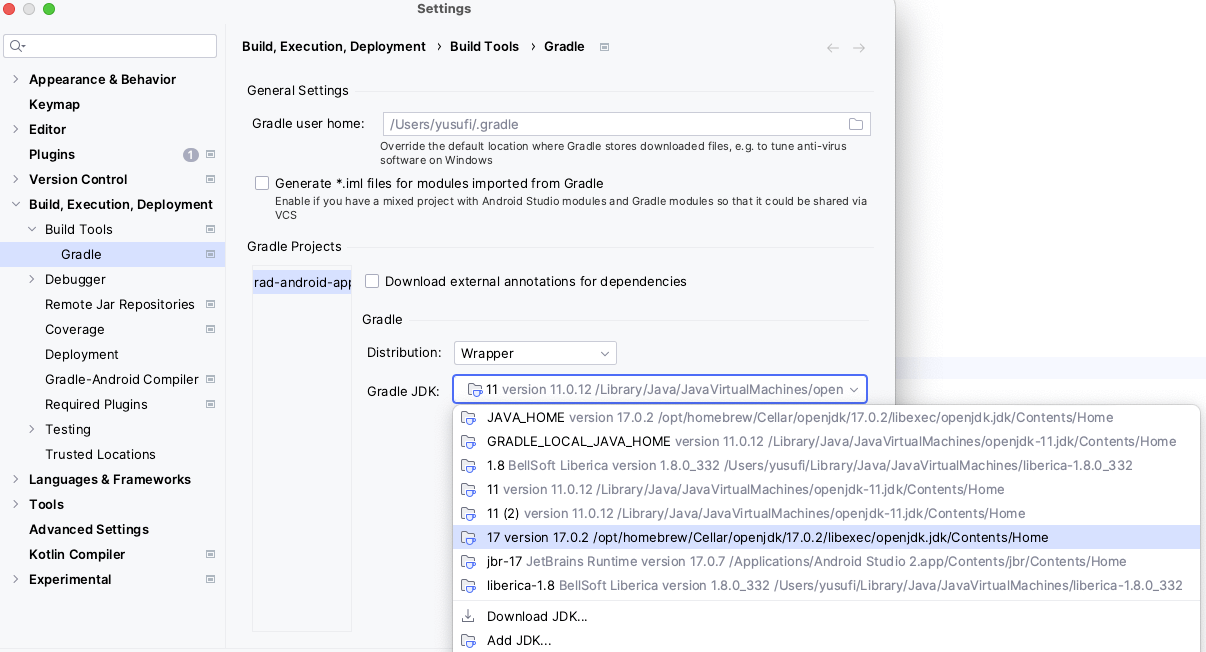
Finally, update the Gradle JDK in Android Studio Settings. Go to File (or Android Studio on macOS) > Settings > Build, Execution, Deployment > Build Tools > Gradle and change the “Gradle JDK” field to “17”.
For more information about the Android build system, visit https://developer.android.com/build.
More Android content
- Sentry Blog Android Manifest Placeholders (opens in a new tab)
- Sentry Blog How to handle Android exceptions and avoid application crashes (opens in a new tab)
- Sentry Blog How to Improve Your Android Debugging Process (opens in a new tab)
- Resources Sentry vs. Crashlytics: The Mobile Developer's Decision-Making Guide (opens in a new tab)
-
 Listen to the Syntax Podcast (opens in a new tab)
 Tasty treats for web developers brought to you by Sentry. Get tips and tricks from Wes Bos and Scott Tolinski.
SEE EPISODES
Considered "not bad" by 4 million developers and more than 150,000 organizations worldwide, Sentry provides code-level observability to many of the world's best-known companies like Disney, Peloton, Cloudflare, Eventbrite, Slack, Supercell, and Rockstar Games. Each month we process billions of exceptions from the most popular products on the internet.