• Error Monitoring
  • Logs
  • Session Replay
  • Tracing
  • Seer
  • Uptime Monitoring
  • Profiling
  • Cron Monitoring
  • AI Code Review
  • Github
  • Slack
  • All Integrations
  • Javascript
  • Python
  • React
  • Laravel
  • Next.js
  • All SDKs

Solutions

  • Web / Full Stack Development
  • Mobile Crash Reporting
  • Game Crash Reporting
  • AI Observability
  • Application Performance Monitoring
  • Real User Monitoring
  • Ecommerce
  • Enterprise
  • Blog
  • Changelog
  • Sandbox
  • Resources
  • Sentry Answers
  • Syntax
  • Customers
  • For Startups
  • Contact Us
  • Help Center
  • Status
  • Sentry Build
  • Events
  • Merch
Docs
Pricing
Sign InGet DemoGet Started
  • Products

    • Error Monitoring
    • LogsNEW
    • Session Replay
    • Tracing
    • SeerNEW
    • Uptime Monitoring
    • Profiling
    • Cron Monitoring
    • AI Code ReviewNEW

    Products

    • Error Monitoring
    • LogsNEW
    • Session Replay
    • Tracing
    • SeerNEW
    • Uptime Monitoring
    • Profiling
    • Cron Monitoring
    • AI Code ReviewNEW

    Integrations

    • Github
    • Slack
    • All Integrations

    Integrations

    • Github
    • Slack
    • All Integrations

    SDKs

    • Javascript
    • Python
    • React
    • Laravel
    • Next.js
    • All SDKs

    SDKs

    • Javascript
    • Python
    • React
    • Laravel
    • Next.js
    • All SDKs
  • Solutions

    • Web / Full Stack Development
    • Mobile Crash Reporting
    • Game Crash Reporting
    • AI Observability
    • Application Performance Monitoring
    • Real User Monitoring
    • Ecommerce
    • Enterprise
  • Learn

    • Blog
    • Changelog
    • Sandbox
    • Resources
    • Sentry Answers
    • Syntax
    • Customers
    • For Startups

    Learn

    • Blog
    • Changelog
    • Sandbox
    • Resources
    • Sentry Answers
    • Syntax
    • Customers
    • For Startups

    Support

    • Contact Us
    • Help Center
    • Status

    Support

    • Contact Us
    • Help Center
    • Status

    Hang out with us

    • Sentry Build
    • Events
    • Merch

    Hang out with us

    • Sentry Build
    • Events
    • Merch
    Holiday E-Commerce Checklist: A Developer’s Survival Guide

    Holiday E-Commerce Checklist: A Developer’s Survival Guide

    There’s never a good time for errors or performance degradations to show up, but during periods of peak traffic like the holidays, it’s especially critical to get immediate answers about what's failing and how to fix it.

    Learn More
  • Docs
  • Pricing
Sign InGet DemoGet Started
Sentry Changelog Illustration

Sentry Changelog

Follow Twitter@SentryChangelog to stay up to date on everything from product updates to SDK changes.

Categories:

Jump to:

User Frustration Signals: Rage and Dead Clicks in Session Replay

Go beyond errors and performance issues and understand when users are frustrated with rage and dead clicks in Session Replay!
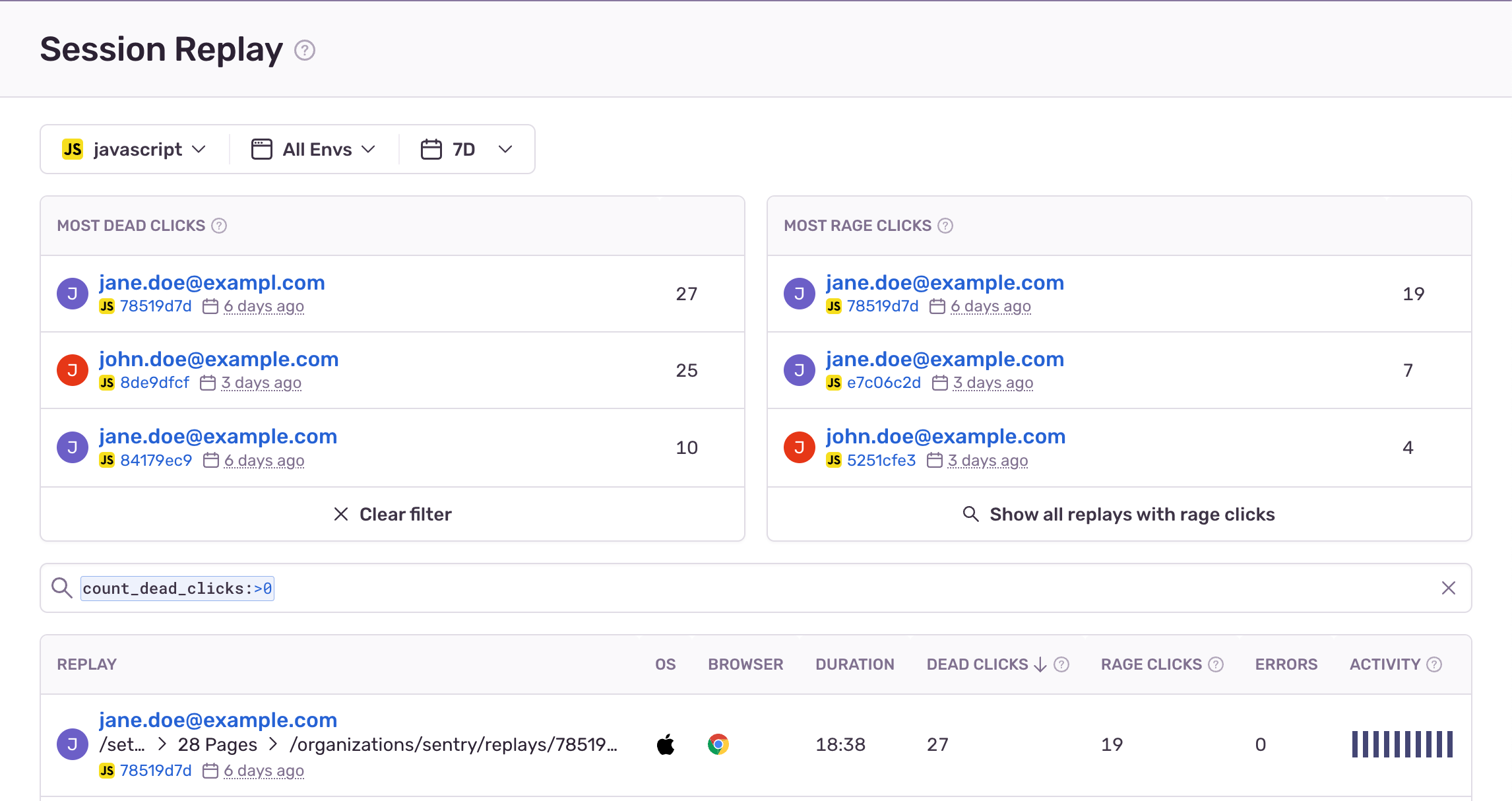
Rage and dead click cards are now at the top of your Replays page.

Rage clicks: five or more clicks rapidly on the same element. These clicks signal that your website or app didn't react the way your users expected.
Dead clicks: user clicks on an interactive element that does not result in any page activity (i.e., no DOM changes) after a few seconds. Examples of dead clicks are where a button is broken/unresponsive, or there's misleading UX where a disabled component is still being clicked.

Know where rage and clicks happen within any replay by viewing the timeline or filtering the DOM Events component to 'Rage & Dead Click'.

These are the prerequisites to use the feature:
1. Your org needs to have sent replay events
2. JavaScript SDK (or related framework) version of 7.60.1 or higher

August 10, 2023
Your code is broken. Let's Fix it.
Get Started