• Error Monitoring
  • Logs
  • Session Replay
  • Tracing
  • Seer
  • Uptime Monitoring
  • Profiling
  • Cron Monitoring
  • AI Code Review
  • Github
  • Slack
  • All Integrations
  • Javascript
  • Python
  • React
  • Laravel
  • Next.js
  • All SDKs

Solutions

  • Web / Full Stack Development
  • Mobile Crash Reporting
  • Game Crash Reporting
  • AI Observability
  • Application Performance Monitoring
  • Real User Monitoring
  • Ecommerce
  • Enterprise
  • Blog
  • Changelog
  • Sandbox
  • Resources
  • Sentry Answers
  • Syntax
  • Customers
  • For Startups
  • Contact Us
  • Help Center
  • Status
  • Sentry Build
  • Events
  • Merch
Docs
Pricing
Sign InGet DemoGet Started
  • Products

    • Error Monitoring
    • LogsNEW
    • Session Replay
    • Tracing
    • SeerNEW
    • Uptime Monitoring
    • Profiling
    • Cron Monitoring
    • AI Code ReviewNEW

    Products

    • Error Monitoring
    • LogsNEW
    • Session Replay
    • Tracing
    • SeerNEW
    • Uptime Monitoring
    • Profiling
    • Cron Monitoring
    • AI Code ReviewNEW

    Integrations

    • Github
    • Slack
    • All Integrations

    Integrations

    • Github
    • Slack
    • All Integrations

    SDKs

    • Javascript
    • Python
    • React
    • Laravel
    • Next.js
    • All SDKs

    SDKs

    • Javascript
    • Python
    • React
    • Laravel
    • Next.js
    • All SDKs
  • Solutions

    • Web / Full Stack Development
    • Mobile Crash Reporting
    • Game Crash Reporting
    • AI Observability
    • Application Performance Monitoring
    • Real User Monitoring
    • Ecommerce
    • Enterprise
  • Learn

    • Blog
    • Changelog
    • Sandbox
    • Resources
    • Sentry Answers
    • Syntax
    • Customers
    • For Startups

    Learn

    • Blog
    • Changelog
    • Sandbox
    • Resources
    • Sentry Answers
    • Syntax
    • Customers
    • For Startups

    Support

    • Contact Us
    • Help Center
    • Status

    Support

    • Contact Us
    • Help Center
    • Status

    Hang out with us

    • Sentry Build
    • Events
    • Merch

    Hang out with us

    • Sentry Build
    • Events
    • Merch
    Holiday E-Commerce Checklist: A Developer’s Survival Guide

    Holiday E-Commerce Checklist: A Developer’s Survival Guide

    There’s never a good time for errors or performance degradations to show up, but during periods of peak traffic like the holidays, it’s especially critical to get immediate answers about what's failing and how to fix it.

    Learn More
  • Docs
  • Pricing
Sign InGet DemoGet Started
Sentry Changelog Illustration

Sentry Changelog

Follow Twitter@SentryChangelog to stay up to date on everything from product updates to SDK changes.

Categories:

Jump to:

Diff Hydration Errors with Replay

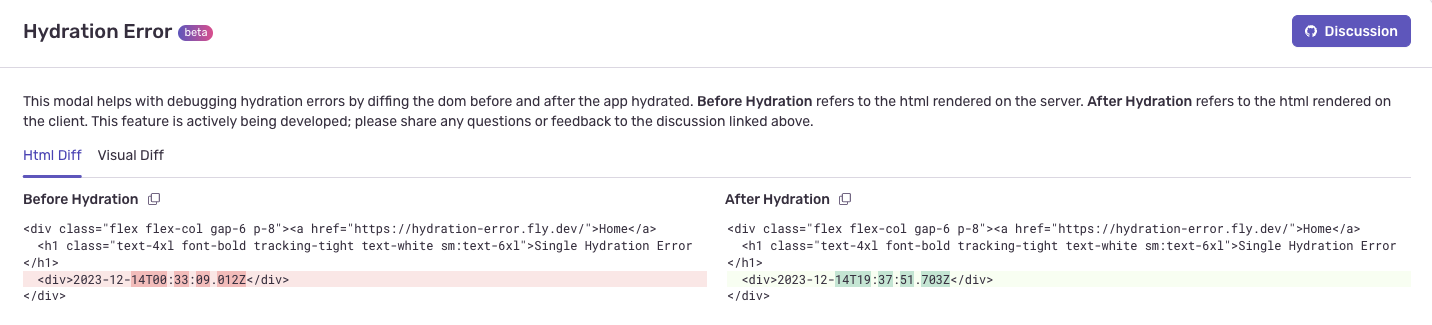
If you’re using Next.js with Sentry’s Session Replay, we’ve launched an experimental Hydration Error diff tool. Displaying a diff of the page before and after react has hydrated can help you find the element or attribute that caused the hydration error. The easiest ones to spot using a diff are text content mismatches, incorrectly nested html elements, and attribute changes.

To get started:

  • Have Session Replay set up and using a browser JavaScript SDK (or related framework) version of 7.90.0 or later

  • Capture a hydration error and view the replay

  • In the breadcrumbs tab, look for the “Open Hydration Diff” button
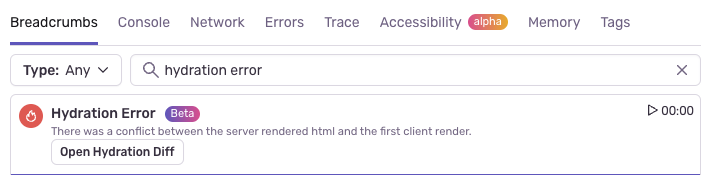
This will open a modal with a html and visual diff. In this example, a date inside a div was rendered on the server and rendered differently on the client causing a hydration error.
To find replays with hydration errors more easily, disable the hydration error inbound filter by navigating to [Project] > Project Settings > Inbound Filters and turning off the hydration error filter. For more information on inbound filters, see our docs.

We want to hear from you on how helpful you find this feature. Please share any questions, comments, or feedback to this discussion.
January 5, 2024
Your code is broken. Let's Fix it.
Get Started