• Error Monitoring
  • Logs
  • Session Replay
  • Tracing
  • Seer
  • Uptime Monitoring
  • Profiling
  • Cron Monitoring
  • AI Code Review
  • Github
  • Slack
  • All Integrations
  • Javascript
  • Python
  • React
  • Laravel
  • Next.js
  • All SDKs

Solutions

  • Web / Full Stack Development
  • Mobile Crash Reporting
  • Game Crash Reporting
  • AI Observability
  • Application Performance Monitoring
  • Real User Monitoring
  • Ecommerce
  • Enterprise
  • Blog
  • Changelog
  • Sandbox
  • Resources
  • Sentry Answers
  • Syntax
  • Customers
  • For Startups
  • Contact Us
  • Help Center
  • Status
  • Sentry Build
  • Events
  • Merch
Docs
Pricing
Sign InGet DemoGet Started
  • Products

    • Error Monitoring
    • LogsNEW
    • Session Replay
    • Tracing
    • SeerNEW
    • Uptime Monitoring
    • Profiling
    • Cron Monitoring
    • AI Code ReviewNEW

    Products

    • Error Monitoring
    • LogsNEW
    • Session Replay
    • Tracing
    • SeerNEW
    • Uptime Monitoring
    • Profiling
    • Cron Monitoring
    • AI Code ReviewNEW

    Integrations

    • Github
    • Slack
    • All Integrations

    Integrations

    • Github
    • Slack
    • All Integrations

    SDKs

    • Javascript
    • Python
    • React
    • Laravel
    • Next.js
    • All SDKs

    SDKs

    • Javascript
    • Python
    • React
    • Laravel
    • Next.js
    • All SDKs
  • Solutions

    • Web / Full Stack Development
    • Mobile Crash Reporting
    • Game Crash Reporting
    • AI Observability
    • Application Performance Monitoring
    • Real User Monitoring
    • Ecommerce
    • Enterprise
  • Learn

    • Blog
    • Changelog
    • Sandbox
    • Resources
    • Sentry Answers
    • Syntax
    • Customers
    • For Startups

    Learn

    • Blog
    • Changelog
    • Sandbox
    • Resources
    • Sentry Answers
    • Syntax
    • Customers
    • For Startups

    Support

    • Contact Us
    • Help Center
    • Status

    Support

    • Contact Us
    • Help Center
    • Status

    Hang out with us

    • Sentry Build
    • Events
    • Merch

    Hang out with us

    • Sentry Build
    • Events
    • Merch
    Holiday E-Commerce Checklist: A Developer’s Survival Guide

    Holiday E-Commerce Checklist: A Developer’s Survival Guide

    There’s never a good time for errors or performance degradations to show up, but during periods of peak traffic like the holidays, it’s especially critical to get immediate answers about what's failing and how to fix it.

    Learn More
  • Docs
  • Pricing
Sign InGet DemoGet Started
Sentry Changelog Illustration

Sentry Changelog

Follow Twitter@SentryChangelog to stay up to date on everything from product updates to SDK changes.

Categories:

Jump to:

Anomaly detection simplifies alert configuration–now in beta

Anomaly detection removes the complexity and guesswork of creating metric-based alerts, by automatically recognizing patterns in your data and identifying when something deviates from the norm. It dynamically adjusts thresholds based on seasonality and long-term trends—all out of the box, with zero required configuration. This means fewer false positives and ensures you catch critical issues without the guesswork.
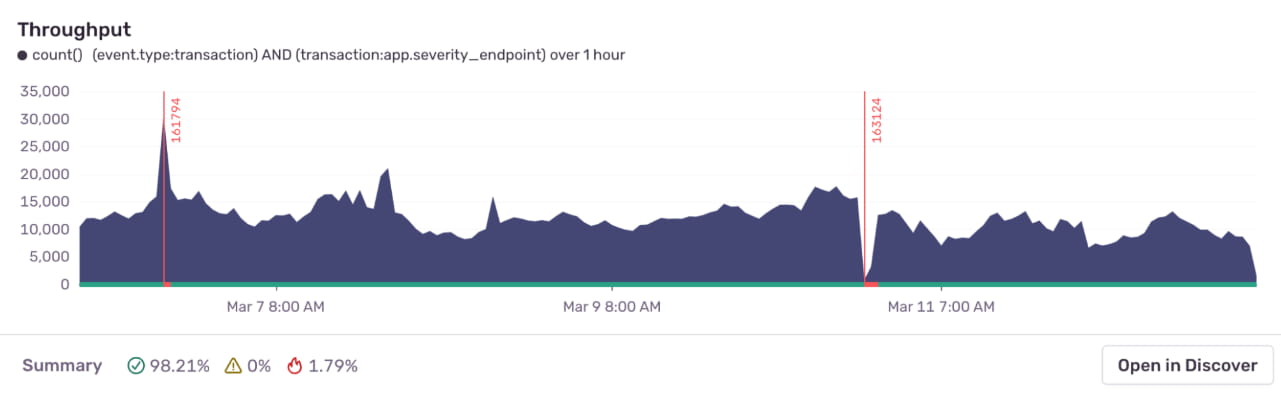
Image showing monitoring a metric, such as application's throughput. The chart shows two "anomalies", indicated by a red bar: a spike and a dip. Sentry opens an alert automatically in response to those anomalies.

For example, you can configure anomaly detection to monitor your app’s throughput. When Sentry detects unusual deviations from regular patterns (“anomalies”) it triggers an alert automatically, such as the spike and dip in red in the chart above. This allows your team to quickly be notified and address the issue.

Anomaly alerts are now available in open beta for all Sentry users on a Trial, Business, or Enterprise plan.
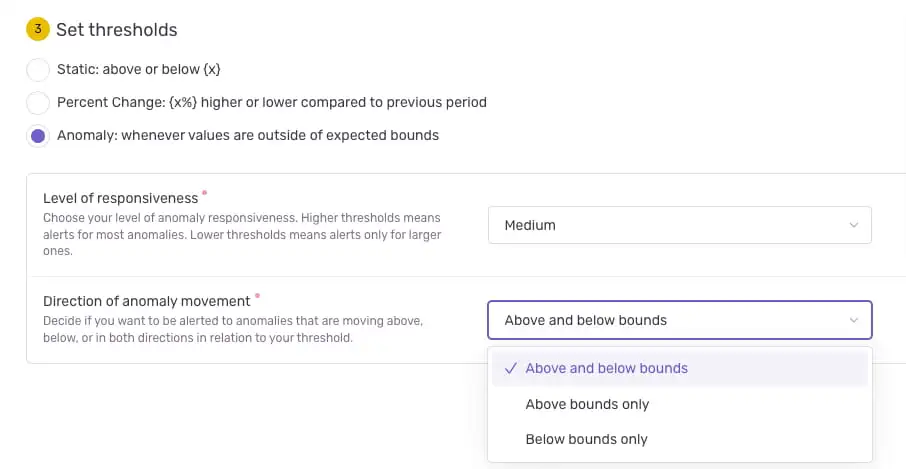
Screenshot of the Sentry interface for creating anomaly alerts

To get started, navigate to the Alerts tab in the left nav bar and click on Create Alert. From there, select a metric and choose Anomaly as your detection method, optionally adjust the sensitivity, and let Sentry handle the rest.

Learn more:

  • Docs: Configure anomaly alerts
  • Blog: Anomaly Alerts Now in Open Beta: Smarter Monitoring, Fewer False Alarms
March 25, 2025
Your code is broken. Let's Fix it.
Get Started