Github
 Slack
Slack
Sentry alerts is splitting into two features — Monitors and Alerts — giving you more control over what you track and how your team gets notified.
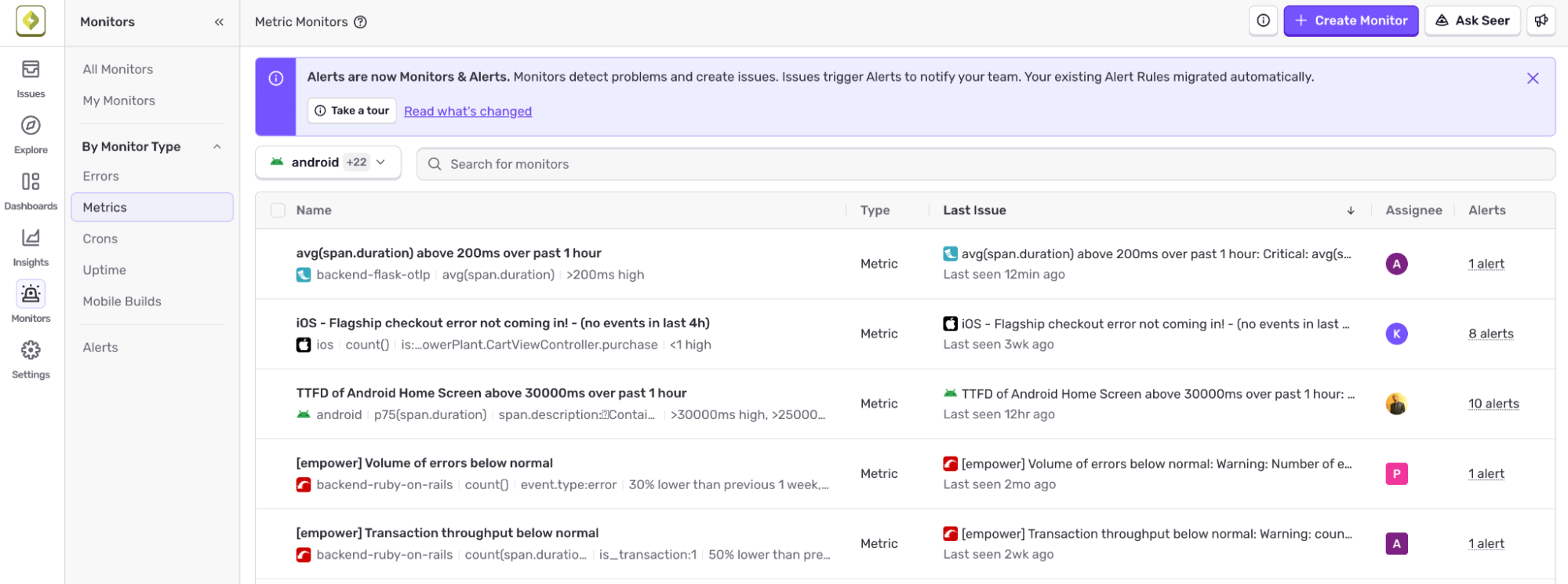 Monitors define what to watch — span attributes, logs, custom metrics, and more. When a threshold is breached, Sentry creates an issue in your stream automatically. Crons and Uptime now live here too.
Alerts define who gets notified and how — Slack, email, PagerDuty, and more. One alert rule can cover multiple monitors across projects, so you can change routing without touching your monitor config.
What this gets you:
- Not every breach deserves a page. Now you can define what your team tracks separately from who gets alerted.
- Every breach creates a trackable issue with context.
- Change who gets paged without touching what's being monitored, and vice versa.
Existing Metric Alerts have been migrated as Metric Monitors and your alert rules are intact, scoped to routing.
Read the FAQ for a full breakdown of what changed, or check out the product docs to get started.