Monitor your Claude Code sessions with Sentry
Add the claude-code-sentry-monitor plugin to get full visibility into tool calls and agent behavior across every Claude Code session.
Before you start
SDKs & packages
- Claude Code installed and configured
- Node.js 18+ installed
Accounts & access
- Sentry account with a Node.js project created
Knowledge
- Basic familiarity with Claude Code slash commands
1 Create a Sentry project
In Sentry, create a new project for your Claude Code monitoring data. Go to Settings → Projects and click Create Project. Select Node.js as the platform, give it a name like claude-code, and copy the DSN from the project settings — you'll need it in step 4.
2 Add the plugin marketplace
Claude Code supports third-party plugin marketplaces. Add the marketplace that hosts the Sentry monitor plugin by running this slash command inside Claude Code.
/plugin marketplace add sergical/claude-code-sentry-monitor 3 Install the plugin and reload
With the marketplace added, install the plugin and reload to activate it. The reload step is required — hooks won't fire until Claude Code picks up the new plugin.
/plugin install claude-code-sentry-monitor
/reload-plugins
4 Run the setup wizard
Tell Claude to set up Sentry monitoring — it will run the plugin's setup skill, prompt you for the DSN you copied in step 1, and write the config to ~/.config/claude-code/sentry-monitor.json automatically.
set up Sentry monitoring 5 Explore traces in Sentry
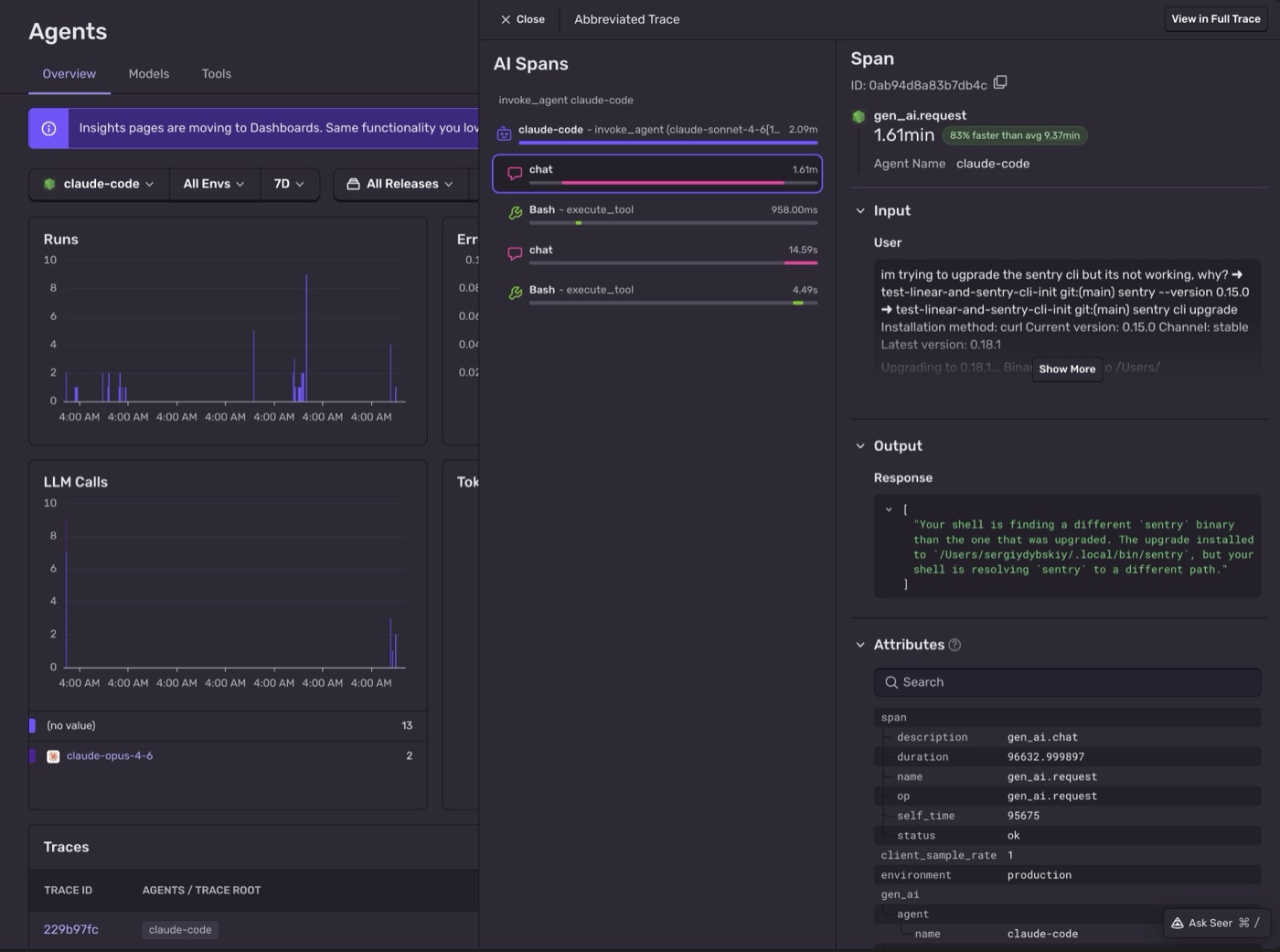
Head to AI Agents Insights in Sentry. Each Claude Code session appears as an invoke_agent root span. Expand a session to see each conversation turn as a gen_ai.request child span — with the message you sent and Claude's reply. Tool calls (read, bash, grep, and others) are nested inside the turn they belong to, as execute_tool spans with durations and metadata.
That's it.
Every tool call, tracked.
You get a complete picture of how Claude Code uses tools across your sessions — so you can understand exactly what it's doing and tune it to your workflow.
- Installed the claude-code-sentry-monitor plugin into Claude Code
- Connected Claude Code sessions to Sentry AI Observability
- Tracked tool calls per session as structured spans
- Explored per-session traces in the Sentry AI Agents dashboard
- Explored per-conversation-turn spans showing which tools Claude used to answer each message
Pro tips
- 💡 Adjust
tracesSampleRatein~/.config/claude-code/sentry-monitor.jsonto reduce volume during heavy sessions. - 💡 Add a
tagsfield with"developer": "yourname"to filter traces by team member in the Sentry dashboard. - 💡 The config lives at
~/.config/claude-code/sentry-monitor.json— you can edit it at any time without reinstalling the plugin.
Common pitfalls
- ⚠️ Forgetting
/reload-pluginsafter install — hooks won't fire until Claude Code reloads the plugin. - ⚠️ Using a browser or Python Sentry DSN instead of a Node.js project — the plugin uses
@sentry/nodeand requires a server-side DSN. - ⚠️ The plugin is user-level, not project-level — one install covers all your Claude Code projects automatically.
Frequently asked questions
What's next?
Fix it, don't observe it.
Get started with the only application monitoring platform that empowers developers to fix application problems without compromising on velocity.