Monitor your pi coding agent sessions with Sentry
Add the pi-sentry-monitor extension to get full visibility into tool calls, token usage, and model costs across every pi session.
Before you start
SDKs & packages
- pi installed and configured
- Node.js 18+ installed
Accounts & access
- Sentry account with a Node.js project created
Knowledge
- Basic familiarity with pi extension configuration
1 Create a Sentry project
In Sentry, create a new project for your pi monitoring data. Go to Settings → Projects and click Create Project. Select Node.js as the platform, give it a name like pi, and copy the DSN from the project settings — you'll need it in step 3.
2 Install the extension
Install pi-sentry-monitor as a global extension using the pi install command. Add the -l flag to install it locally for a specific project instead.
# Install globally (covers all pi sessions)
pi install npm:pi-sentry-monitor

# Or install locally for a single project
pi install -l npm:pi-sentry-monitor
3 Configure your DSN
Create a config file at .pi/sentry-monitor.json in your project directory (or ~/.pi/agent/sentry-monitor.json for a global setup). Add your DSN and set tracesSampleRate to 1 to capture everything during setup.
{
  "dsn": "https://<your-dsn>@o<org>.ingest.sentry.io/<project-id>",
  "tracesSampleRate": 1,
  "agentName": "pi",
  "projectName": "my-project"
}
4 Explore traces in Sentry
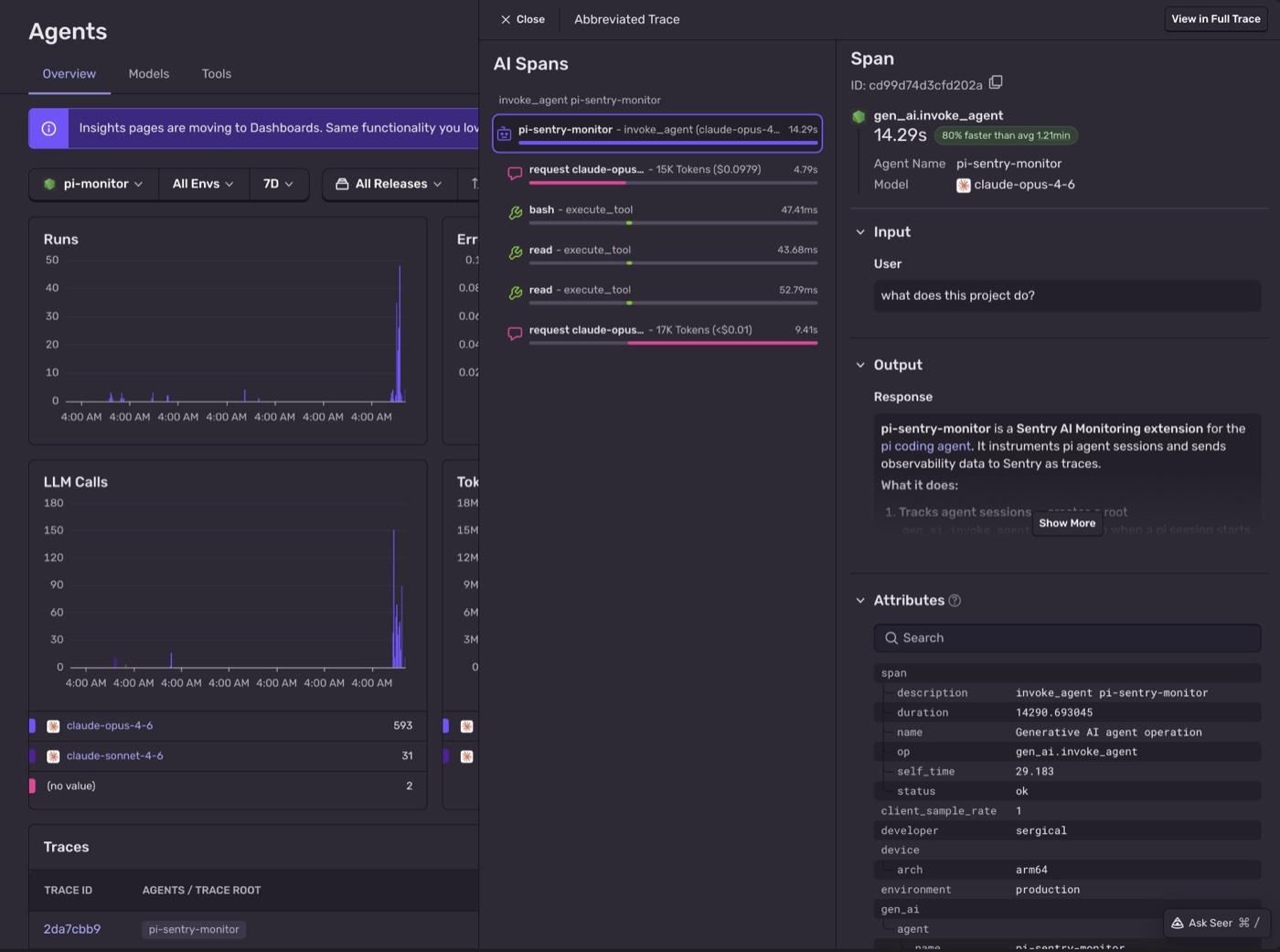
Run a pi session and then head to AI Agents Insights in Sentry. Each session appears as an invoke_agent root span. Expand any session to see execute_tool child spans for every tool call and gen_ai.request spans for each LLM request, including token usage and cost estimates.
That's it.
Every tool call, tracked.
You get a complete picture of how pi uses models and tools across your sessions — including token usage and costs — so you can tune it, debug it, and understand exactly what it's doing.
- Installed the pi-sentry-monitor extension into pi
- Connected pi sessions to Sentry AI Observability
- Tracked tool calls, LLM calls, token usage, and costs per session
- Explored per-session traces in the Sentry AI Agents dashboard
Pro tips
- 💡 Set
includeMessageUsageSpans: truein your config to track token usage and costs per LLM call in the trace view. - 💡 Use
agentNameandprojectNametags in the config to filter and group traces across different pi projects in Sentry. - 💡 pi-sentry-monitor supports subagent detection — multi-agent sessions are captured correctly as nested spans in the trace tree.
Common pitfalls
- ⚠️ Config must be placed at
.pi/sentry-monitor.json(project-level) or~/.pi/agent/sentry-monitor.json(global) — no other locations are read. - ⚠️ Using a browser or Python Sentry DSN instead of a Node.js project — the extension uses
@sentry/nodeand requires a server-side DSN. - ⚠️
enableMetricsisfalseby default — enable it to see aggregated data in Sentry Metrics dashboards.
Frequently asked questions
tracesSampleRate: 1, a heavy day of coding might generate a few hundred traces. Sentry's free tier includes 10,000 spans/month — more than enough to get started.-l) monitors all pi sessions across every project on your machine. A local install (with -l) only monitors sessions run inside that specific project directory.agentName or projectName tags to funnel all sessions into one project with per-developer filtering.What's next?
Fix it, don't observe it.
Get started with the only application monitoring platform that empowers developers to fix application problems without compromising on velocity.