

Skimmer is the pool service industry’s leading management logistics platform. It keeps crews moving – from scheduling and routing to billing – so software never gets in the way of work.
Behind the scenes, a distributed .NET architecture powers weekly Thursday releases: React on the web, .NET MAUI on mobile, and 24+ deployable microservices. With a lean, hands-on team of ~24 engineers and 40–50% YoY growth, Skimmer can’t afford undetected bugs or slow fixes, especially in async, queue-heavy flows.
They needed one tool that turns “what happened?” into why it happened and where. in a click.
Skimmer works in the real world, where users write in things like, “it didn’t work,” and where work executes in async jobs – via queues and background workers – so the cause of a failure may live in a different service and a different moment than where the error shows up.
“With server signals in one place, logs in another, and client/mobile crashes somewhere else, anything that didn’t throw an error could turn into hours of pattern hunting.” — Gary Osteen, Director of Quality and Operations
On a good day, they could triangulate an error. On a typical day, they were stitching logs, backend metrics, and client crash reports to a company ID from a support ticket—hoping the reporter was the actual user behind the error.
Meanwhile, the business was compounding – 40–50% year over year – and the team wasn’t doubling to match. Leadership stayed hands-on: they knew exactly what needed to change. The plan wasn’t *more dashboards, *it was one source of truth, in a place developers will actually use.
Issue-first context vs. complex setup & limited MAUI support
Skimmer put the usual APM suspects up against Sentry. They wired each tool into both .NET Framework and .NET (Core) backends, plus React on the web and .NET MAUI on mobile.
What happened with the traditional APM tools:
- Instrumentation broke past the basics. “Once we moved beyond simple examples, setup got fiddly; docs were inconsistent between .NET Framework 4.8 and .NET (Core), and MAUI support was limited or not on the roadmap.”
- Didn’t play well with existing tools.“We would have had to disable our current tooling completely to get a POC working. Which would make a phased rollout impossible.”
- Integration friction. “Our logging stack (Serilog/.NET logging extensions) wasn’t supported, and there was no clean way to carry context across queues and workers—so backend setup stalled and async traces fell apart.”
Why Sentry won:
-
Issue-first, not dashboard-first. Engineers start where failures live. The issue page shows stack trace (with source maps), the app version, when that version hit prod, and the related commits—plus links to trace and replay.
“We had lots of tools telling us what was happening. Sentry tells us why and how to fix it.” — Glenn Burnside, VP of Engineering
-
Async work stays in one trace. Traces stay intact across queues and workers, so a React click that becomes an API call → enqueue → background handler → DB still reads as one story (publish → dequeue → handle → query), even when steps happen seconds or minutes later on different services.
“We can correlate the user action through queue messaging and handling… it’s all there together.” — Glenn Burnside, VP of Engineering
-
Built for developers (including mobile). The workflow matched their stack and habits: .NET (Framework & Core), React, .NET MAUI, releases, source maps, and Serilog-friendly patterns.
“Most tools felt ops-first. Sentry is developer-first, which fits how we operate. One issue page, all the context—stack traces + source maps, release/version, commits, env/device—and one-click to traces and replays. We get to answers fast.” — Glenn Burnside, VP of Engineering
-
Low overhead, fast ramp. With everything connected, “The learning curve drops when everything’s on one page and we can get anywhere in a click.”
“The dev experience won it: clear issue detail, source maps and releases wired in, and tracing that doesn’t break at queues. Our team can answer ‘what changed?’ in minutes, not hours.” — Gary Osteen, Director of Quality and Operations
Rolling out Sentry (and the 12.7 release)
Skimmer wired Sentry into 24+ projects—React on the web, .NET microservices (Framework & Core), and a .NET MAUI mobile app. Every deploy now carries release + commit metadata, so an issue points to the exact change that shipped; source maps make stack traces readable; and environment tags (test/prod) keep noise separated.
One trace, 3–10× faster answers
Skimmer’s traffic doesn’t finish on the request thread. A React click becomes an API call, publishes to a queue, and a background worker writes to the DB seconds later. Before, that path was a guessing game. Now the same trace/context flows through each hop, so the whole thing reads as one story (publish → dequeue → handle → query). When an error surfaces on a distributed host, the engineer can track it to the original user action – even if it happened in a different service at a different time.
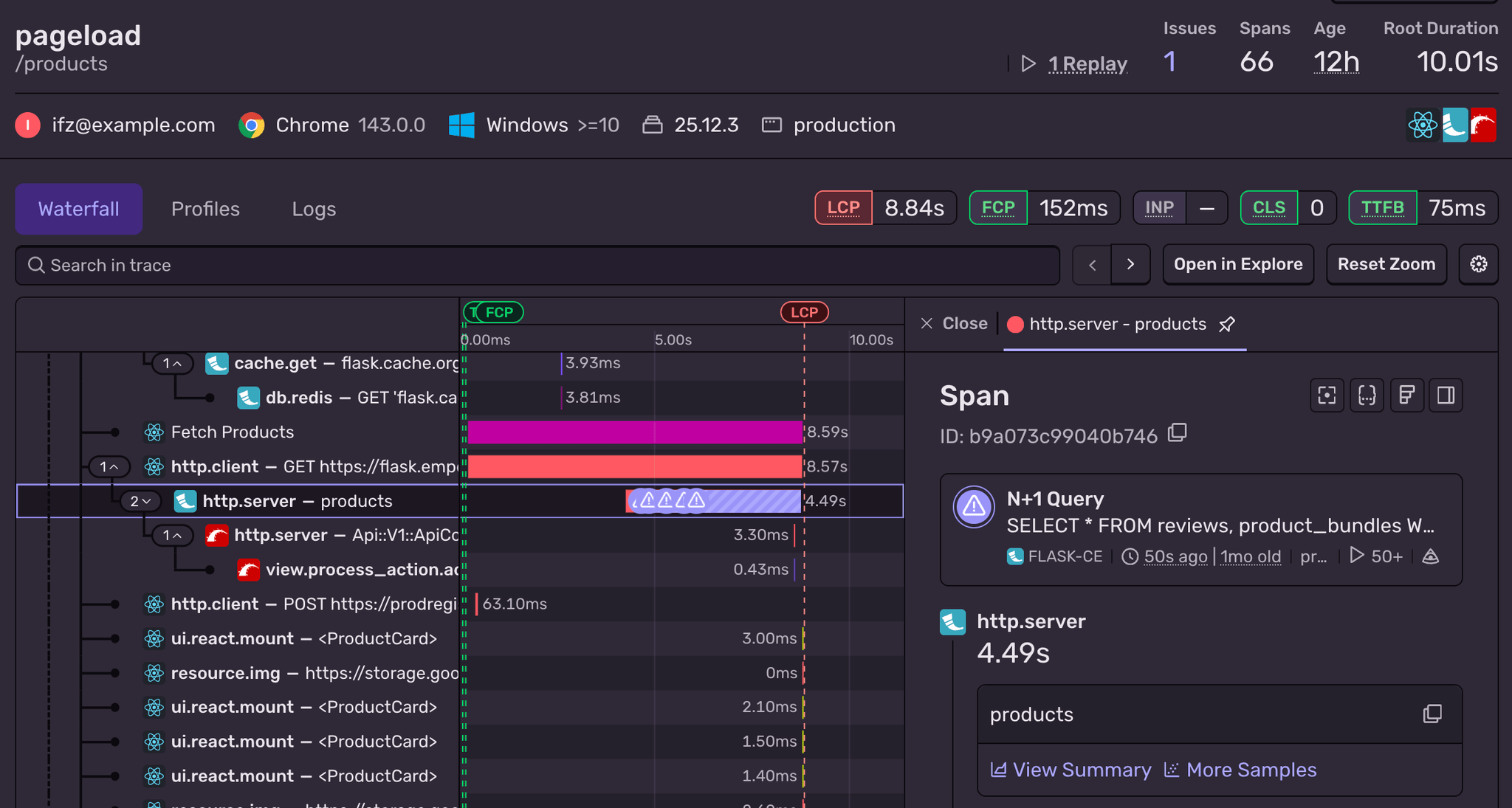
“I can see the handoff from the React app to the API, the message being enqueued, when a worker dequeues it, and the handler processing it… it’s all there together.” — Glenn Burnside, VP of Engineering
That connected view cut investigation time dramatically. Issues that once took hours to reason about now take minutes; smaller ones dropped from tens of minutes to seconds.
“It’s hard to debug work that happens across services and minutes. Now I open the trace and see request → queue → worker → DB in one timeline.” — Glenn Burnside, VP of Engineering
It also paid off on the front end. Because performance signals (TTFB, long tasks, resource waterfalls) sit alongside the same traces, engineers spot patterns while they’re already investigating. During one investigation, a trace made it obvious a client path was hitting the same endpoint 8× in a row. They knew exactly what to do next.
“A trace exposed a client path calling the same endpoint eight times. We made a small change and shipped it in the next release.”
Session Replay cut MTTR by ~95–99% and slashed the back-and-forth chasing context
Support often gets emails like “my app didn’t work today” with no other information from techs who are out cleaning pools. Skimmer’s support reality: field techs email, “my app didn’t work today,” then disappear to clean pools. Reproducing steps used to mean days of back-and-forth—sometimes via a dispatcher—just to learn what screen they were on. They’d even ask the admin to tell “Bob” how to take a screenshot and send it in.
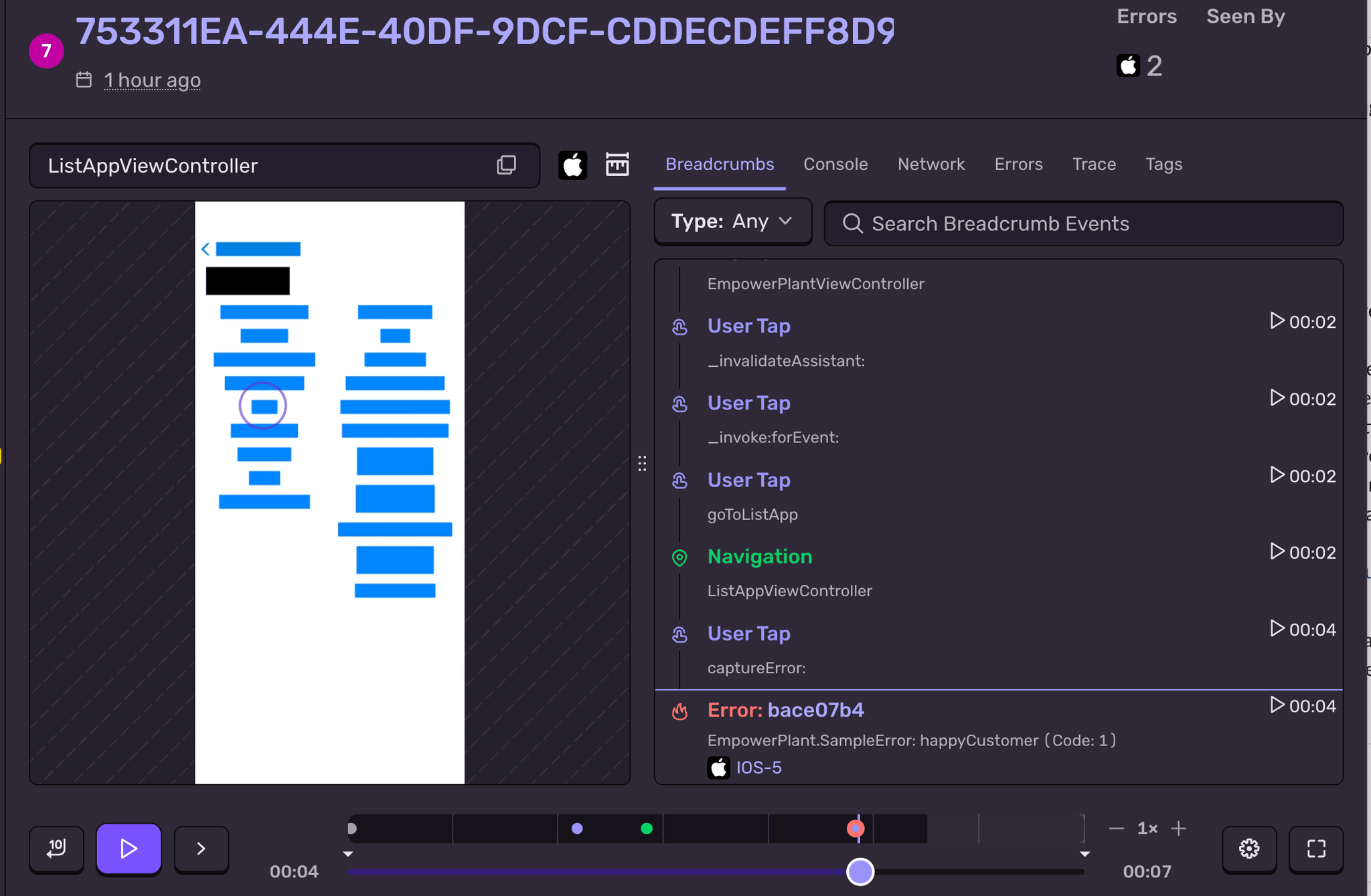
Now those tickets arrive with a Session Replay on the issue. The team opens the replay and watches exactly what the user did at the time of the error—no chasing, no guessing. As Gary put it, this “cuts our resolution of a customer issue down from days to minutes,” and when they demoed it at all-hands, “our support team almost cried they were so happy.”
The 12.7 release: From week-late signals to near-real-time on mobile
The “this is it” moment was mobile release 12.7. Their phased rollout started at 10% (they normally take ~7 days to reach 100%). Minutes into the rollout, Sentry flagged abnormal behavior tied to that release. Before any customer reports, the team opened the issue, followed the trace + release marker back to the change, and built a patch. They shipped the patch during the same phased rollout and pushed to 100% a couple of days earlier than usual.
“We were ahead of our customer experience—we saw it, fixed it, and got the patch into the store before customers ran into it.” — Gary Osteen, Director of Quality & Operations
~5 days later, the app store sent its “higher crash rate than usual” email—helpful, just late. The fix was already live.
“We went from a week behind to near real-time on mobile.” — Gary Osteen, Director of Quality & Operations
Logs with zero context switching
When Skimmer turned on Sentry Logs in production, by week 1 it immediately changed how they debug. Instead of crafting ad-hoc queries in a separate system, engineers can click to group/aggregate by fields and spot patterns in seconds. Day one, that surfaced a simple but noisy culprit: two services were emitting debug instead of info, bloating noise and hiding signal. Because logs now live next to the issue, trace, and replay, triage stays in one place.
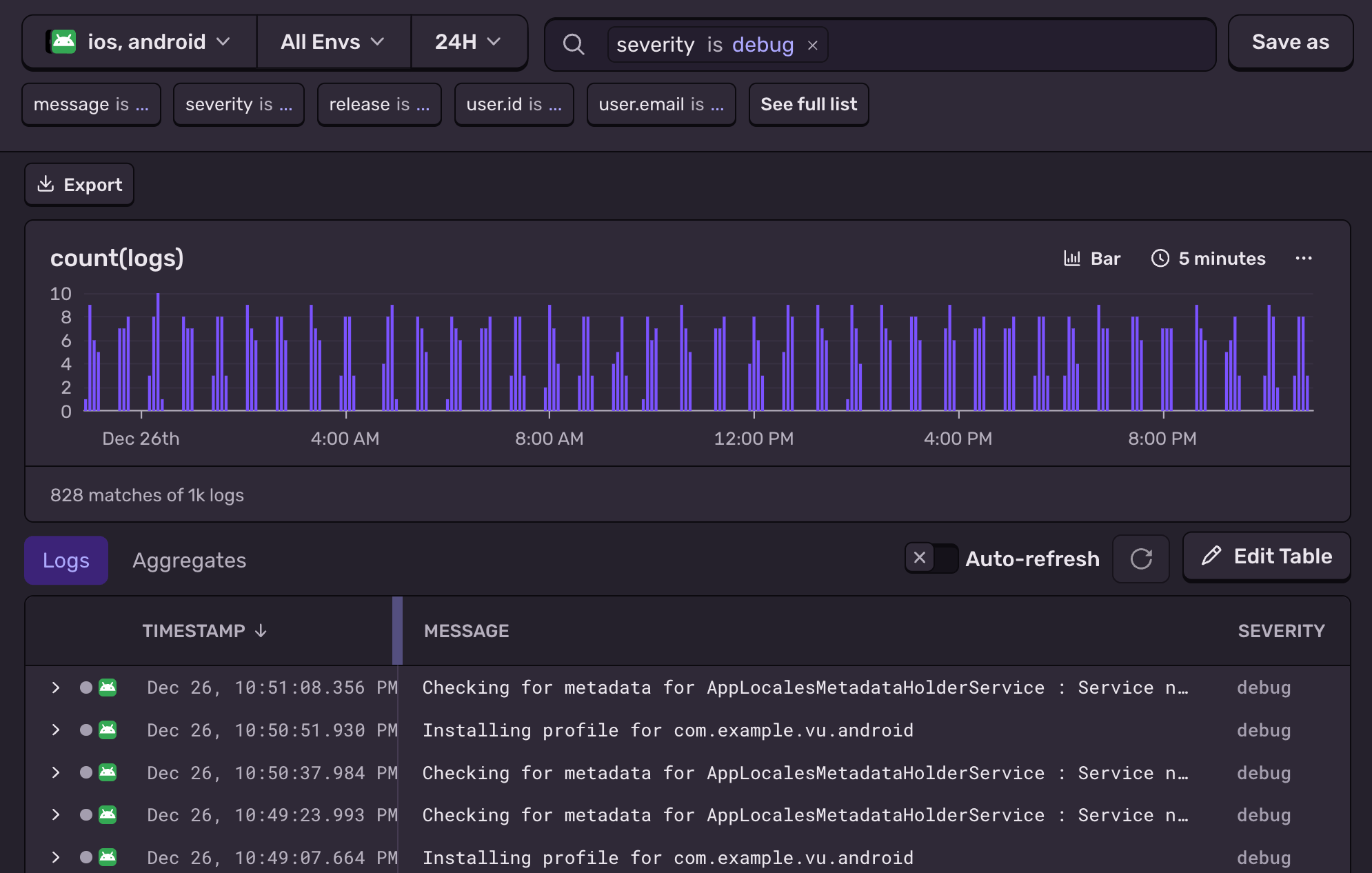
“With logs linked right from the issue, we don’t leave Sentry to investigate anymore. Triage is quicker, and the whole stack is simpler to run.”— Gary Osteen, Director of Quality and Operations
Results
- 95% faster mobile issue detection
- Mobile fixes out 60% faster: from 6-7 days to 2-3 days
- 10× faster resolution of customer tickets Session Replay cuts customer support back-and-forth from days to minutes.
- Triaged performance issues 90% faster: from hours/days to minutes via performance alerts + a trace that highlights the exact slow DB query/span.