
Sentry vs Crashlytics
Outgrown Crashlytics?
Crashlytics might work if you are just starting out, but as your team and users grow, its limited customization, superficial context, and cumbersome workflows will slow you down. Switch to Sentry as a Crashlytics alternative for mobile crash reporting and monitoring that grows with you.
18,000+ mobile teams rely on Sentry for the stability and performance of their mobile apps
Sentry vs Crashlytics: Get meaningful alerts
Create custom issue and metric alerts to get notified when it really matters. Integrate with Slack, PagerDuty, and other key applications to get alerted wherever you work with all the info you need to resolve issues fast.
LEARN MORE ABOUT ALERTS AND NOTIFICATIONSGain complete visibility
Don't waste time comparing logs or second guessing. Get accurate, real-time insight into errors, crashes, and performance issues by device type, OS, and release. As a Crashlytics alternative, Sentry helps you resolve issues fast with deep, actionable context, including breadcrumbs, screenshots, stack traces, suspect commits, and Session Replay. Crashlytics provides only limited stack traces.
READ ABOUT CRASH REPORTING
Save time with efficient workflows
Crashlytics doesn't provide tools for triaging, prioritizing, or assigning issues. It also lacks deep integrations with Jira, GitHub, and other apps. Sentry has two-way integrations with all your favorite source code, project management, and deployment apps, giving you the context you need to solve bugs and issues without checking other tools. With codeowners and suspect commits, find the right person to handle a bug fast, and auto-assign issues for quicker resolution.
LEARN MORE ABOUT OWNERSHIP RULES
Boost your app ratings
Identify and solve mobile application performance issues, like long app start times, janky frame rendering, and slow HTTP requests, before they impact your customer's experience. With Distributed Tracing, identify backend issues that may affect mobile performance, without consulting other tools or engineers.
LEARN MORE ABOUT PERFORMANCE MONITORING
Find and fix performance bottlenecks
Get code-level insight into how your application performs in production environments on real user devices with Profiling. Find the root cause of slowdowns and issues consuming excessive CPU and affecting application performance on your user's mobile device.
READ MORE ABOUT PROFILING
Get source map support for React Native
Voted the top crash reporting solution among React Native developers , Sentry provides auto instrumentation for React Native, including source map support to automatically get unminified stack traces. Crashlytics does not provide auto instrumentation for React Native or source map support.
READ MORE ABOUT SOURCE MAPS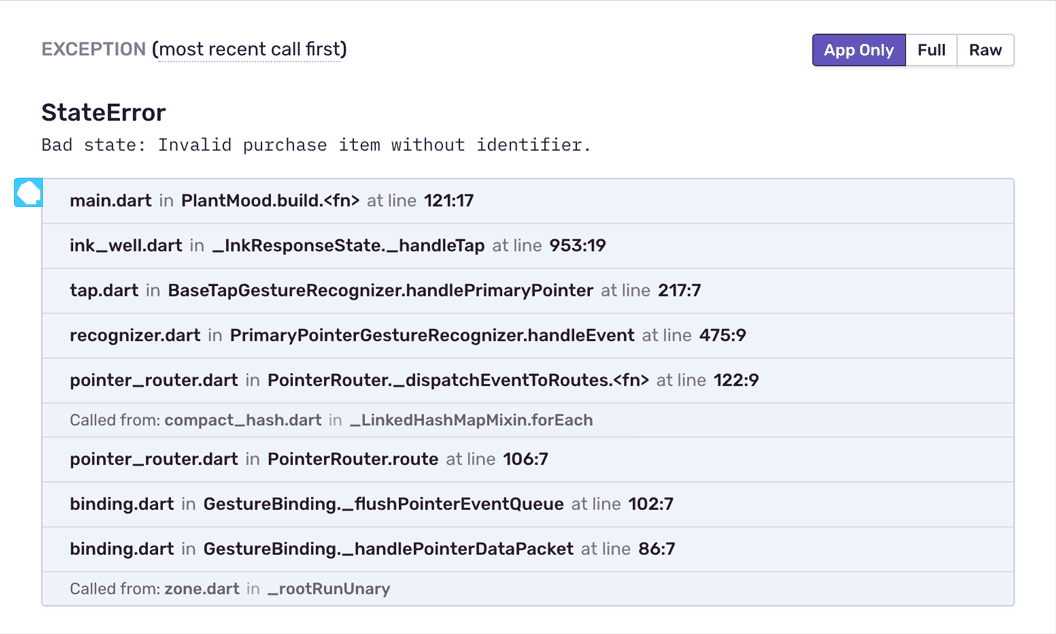
Crash reporting for your Flutter app in production
Monitor and debug your Flutter app on any platform, including mobile, desktop and web. Get Flutter app crash reports with context from the stack trace (including for minified or obfuscated Flutter code), device data, breadcrumbs, and mobile performance insights so you can fix issues faster.
Read More About Flutter Support
Move to Jetpack Compose and SwiftUI
Make the switch to building declarative UI for native apps. Sentry's integration automatically captures user interactions as breadcrumbs and transactions, so you can quickly understand and solve any related issues. Crashlytics does not offer support for these toolkits.
Learn more about Jetpack Compose and Swift UI .
"We had been using Firebase's Crashlytics to get insights into app crashes that our users are facing. Crashlytics, however, does not support source maps from React Native, so it was always difficult trying to understand exactly where a crash originated from and what change might've introduced it. Sentry makes it easy to identify new crashes and where they are coming from, as well as how stable the app is across versions."
Sentry
Crashlytics
Get Started in Minutes
Try Sentry for free. Start monitoring and improving the stability and performance of your mobile apps with just a few lines of code.