When a new issue hits, Seer investigates automatically to find what broke and why.
By the time you open your laptop, there's already a pull request waiting.
Seer is Sentry's debugging agent. It turns your telemetry into answers and gets you the fix, right where you're already working.
When a new issue hits, Seer investigates automatically to find what broke and why.
By the time you open your laptop, there's already a pull request waiting.
Not everything starts with a Sentry alert. Sometimes you just know something is… off.
Describe what you're seeing in plain language. Seer pulls the relevant signals and answers the questions that don't have an obvious starting point or solution.
Seer doesn't just live in Sentry's UI.
Send fixes to Claude, CoPilot, or Cursor.
Fix bugs from a Slack alert.
Start an incident investigation in Slack where your whole team can see what's happening.
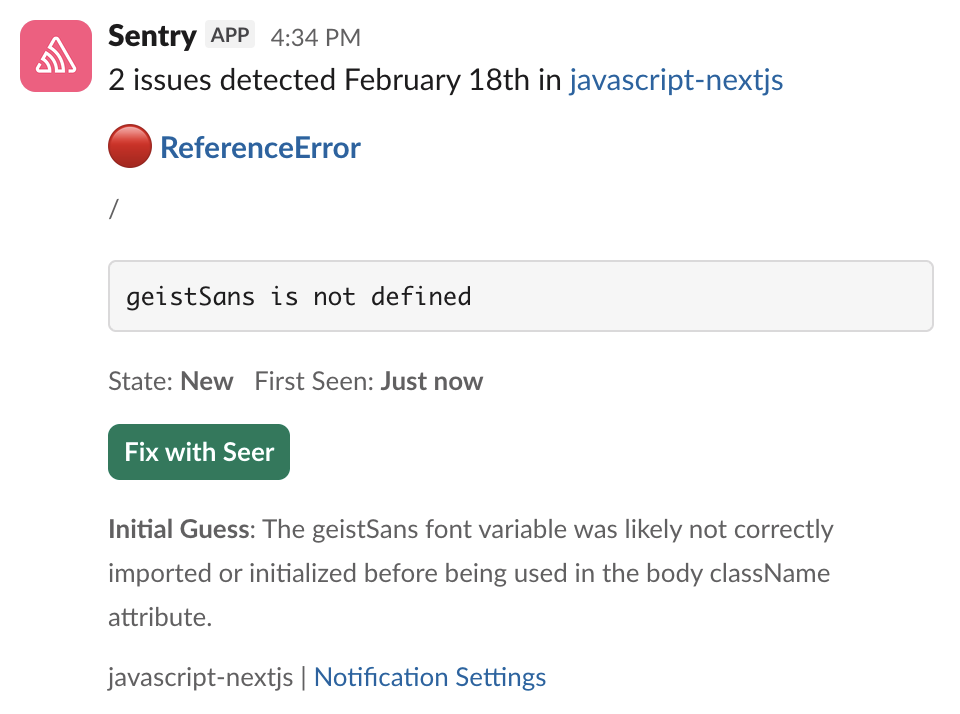
No context-gathering, no copy-pasting stack traces. Just ask Seer Agent what's wrong and get an answer from your actual production data.
Seer Autofix reads the stack trace, traces the root cause through your codebase, and drafts a fix — before you've finished reading the alert.
Seer reviews your PRs against real production data — the errors, traces, and failure patterns Sentry has already seen from your app. If your change is going to cause problems, Seer tells you without spamming your PR.
Seer gives us exactly what we need — straight to the point, fast, and accurate. It’s saved us hours per feature, and that translates to the bottom line.
Read MorePresident @Honra testimonialSentry [Seer] is actually… good? One-shot fixed this error that I've spent the last 2 hours debugging
Read MoreSeer provided insights that led us to a fix within 30 minutes, for a bug that would have taken an engineer at least a day otherwise.
Amazing. @getsentry Seer did better than I would have. I wouldn't have thought to have a special ogType for articles. https://t.co/Y44lHdMitM
Read MoreSeer is available to all Sentry users on a paid plan (Team, Business, or Enterprise) at $40 per active contributor, per month. An active contributor is anyone who commits two or more PRs in a connected repo.
More details are available in the Seer pricing docs.
All Sentry users on a paid plan or trial can use Seer. You will be prompted to enable Seer and generative AI features within the Sentry interface upon attempting to use them for the first time.
Seer can fix most bugs and performance issues in your application. Seer includes issue scan, which intelligently tries to determine the likelihood that an issue can be fixed with a code change, and enables you to run Seer on those issues. Alternatively, you can configure Seer to run issue fix automatically on issues that it believes it can help you fix.
Seer supports all programming languages and frameworks supported by Sentry, including web (frontend and backend), mobile, and desktop. Virtually all modern programming and configuration languages are supported, and then some more.
Seer respects your privacy and your data, and it comes with robust guarantees:
AI-generated output from your data is shown only to you, not other customers
Your data is not used to train generative AI models without your express consent (off by default)
We process your data only via trusted subprocessors that are not allowed to use your data to train their own models
You can read more in our docs.
Teams that want to turn off Seer and generative AI features can go to Settings → Organization → General Settings → Enable Generative AI Features and disable the feature toggle.
Sign up for our newsletter.
And yes, it really is monthly. Ok, maybe the occasional twice a month, but for sure not like one of those daily ones that you just tune out after a while.
Get started with the only application monitoring platform that empowers developers to fix application problems without compromising on velocity.